





WhatsApp Business Automation: Reply to Every Lead Instantly (Setup Guide for Indian Businesses)

If your enquiries arrive on WhatsApp, the business that replies first usually wins the customer. That is hard to do by hand when leads come in at night, on weekends or while you are with another client. WhatsApp Business automation fixes this by replying instantly, asking the right questions and saving every contact for you.

Why WhatsApp beats website forms in India
Most Indian customers are more comfortable sending a WhatsApp message than filling in a long form. They can ask a quick question, share a photo or voice note, and get an answer on the app they already use all day. For real estate brokers, clinics, consultants, event managers and online stores, WhatsApp is often the main sales channel, whether or not it has been set up properly.
What WhatsApp automation actually does
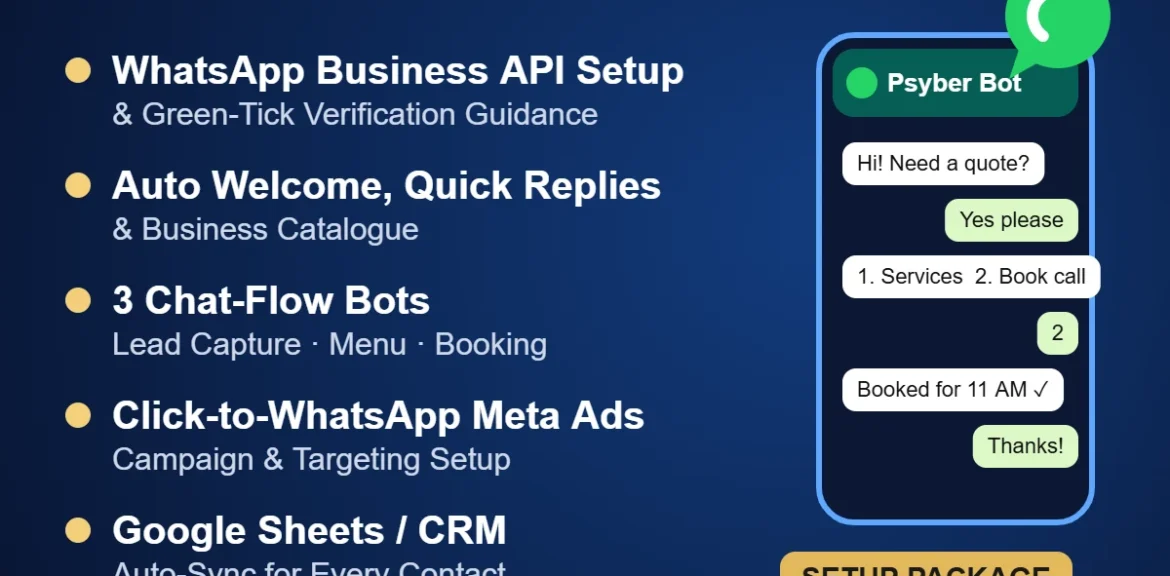
- Instant welcome message: every new chat gets a reply within seconds, with your menu of options.
- Quick replies: saved answers for pricing questions, location, timings and documents.
- Catalogue: customers browse your services or products without leaving WhatsApp.
- Chat-flow bots: guided conversations that capture a lead’s details, show a service menu or book an appointment.
- CRM sync: each contact is saved to Google Sheets or your CRM automatically, so nobody falls through the cracks.
WhatsApp Business app vs. WhatsApp Business API
The free WhatsApp Business app is fine for a single person replying from one phone. Once you need several team members, chatbots, CRM integration or click-to-WhatsApp ads at scale, the official WhatsApp Business API (through a Meta business solution provider) is the right tool. The API is also what you need to apply for the green-tick verified badge.
Connecting ads to WhatsApp
Click-to-WhatsApp ads on Facebook and Instagram open a chat with your business instead of a landing page. Combined with an automated first reply, this is one of the fastest ways to turn ad clicks into real conversations. The key is targeting the right audience and having the bot qualify leads before your team steps in.
Common mistakes to avoid
- Sending bulk promotional messages to people who never opted in. It can get your number restricted.
- Bots with too many menu levels. Keep flows short and always offer a “talk to a person” option.
- Not saving contacts anywhere. If leads live only in one phone, you lose them when that phone or that employee leaves.
Psyber’s WhatsApp Business Automation & CRM Setup
Our WhatsApp Business Automation & CRM Setup (₹6,999 + GST) covers the official API setup and green-tick guidance, automated welcome messages and quick replies, catalogue integration, three chat-flow bots (lead capture, service menu, instant booking), a click-to-WhatsApp Meta ad campaign setup and Google Sheets or CRM auto-sync.
WhatsApp Business Automation & CRM Setup: ₹6,999 + GST
Turn every click into an instant sale. Never lose a lead to late replies.
Book on WhatsApp See package detailsFrequently asked questions
Do I need the WhatsApp Business API for automation?
For basic auto-replies the free WhatsApp Business app works. For chatbots, multiple agents, CRM sync and green-tick verification you need the official API.
Can I get the green tick?
Meta decides who gets verified. We set up your account correctly and guide you through the application, but approval is not guaranteed.
Will my existing number work?
Usually yes, but a number used on the WhatsApp app must be migrated to the API. We explain the steps before starting.